
18 September 2026
Case StudyBalance confirmations, out of the inboxes
Balance confirmations for statutory audits used to run on email threads, Word templates and OneDrive folders. Now each request is a hosted form with a live status and a full audit trail: 100+ completed last year.
This is the second system we built for the audit firm from our timesheet case study. During a statutory audit, the firm requests external confirmations on its clients' behalf: banks confirm cash balances, customers and suppliers confirm receivables and payables, lenders confirm loans. Last year the firm ran this process for around 30 audit clients and collected more than 100 confirmations through the platform.
How confirmations were managed before
The confirmation process itself was in good order. The client's accounts identified which balances needed external confirmation, and the firm worked from a standard positive confirmation template, blank or pre-filled, the forms ISA 505 describes. Requests went out by email to each counterparty: the bank, the main customers and suppliers, the lenders.
The difficulties sat in the medium rather than the method. Replies arrived as whatever the counterparty's systems produce: some counterparties filled the template, and many sent an export from their accounting software instead, a WinMentor or SAP printout showing the balance its own way. Each response landed in a different inbox, was filed into OneDrive folders, and was recorded by hand on a tracking sheet of who had responded and who was still outstanding. Reminders were a separate manual step, and so was reporting progress to the engagement team.
That is the trade-off of running external confirmation requests over email. Sending is easy; keeping track is not, because the status lives in the inboxes and the tracker at once. Routine questions, how many requests are outstanding, which have been viewed, what arrived and when, mean opening folders and counting. The evidence trail ISA 505 expects the file to demonstrate is reconstructed the same way: what was sent, when the counterparty accessed it, what they returned.
The AI request, and the problem behind it
The first request on this project was for an AI solution: read the exports, categorise them, extract the numbers and paste them into the Word files. The extraction part works; a model will find a balance in a WinMentor printout. Everything else the process needs would stay exactly as it was: requests sent by hand, replies filed by hand, the tracker maintained by hand, and one new failure mode added, a number extracted confidently from a document that still has to be checked by a person.
So the brief changed shape with the client's agreement. Reading the numbers is the quick part of the process; the loop around them, send, wait, chase, log, prove, is where the time goes. What that loop needed was a system of record, and the extraction, where it earns its place, sits on top of one later.
What we built
Two pieces, deliberately plain.
- A confirmation page per recipient, behind a personal link. Instead of an email thread, the recipient opens a link, identifies with their email, confirms a six-digit code, and lands on a form that asks only what this request asks: the balance of payables or receivables, purchases, advances, loans, interest, guarantees. They attach whatever their systems produce, a filled template, a WinMentor or SAP export, a bank statement, and submit. No account is needed, and the session expires on the due date.
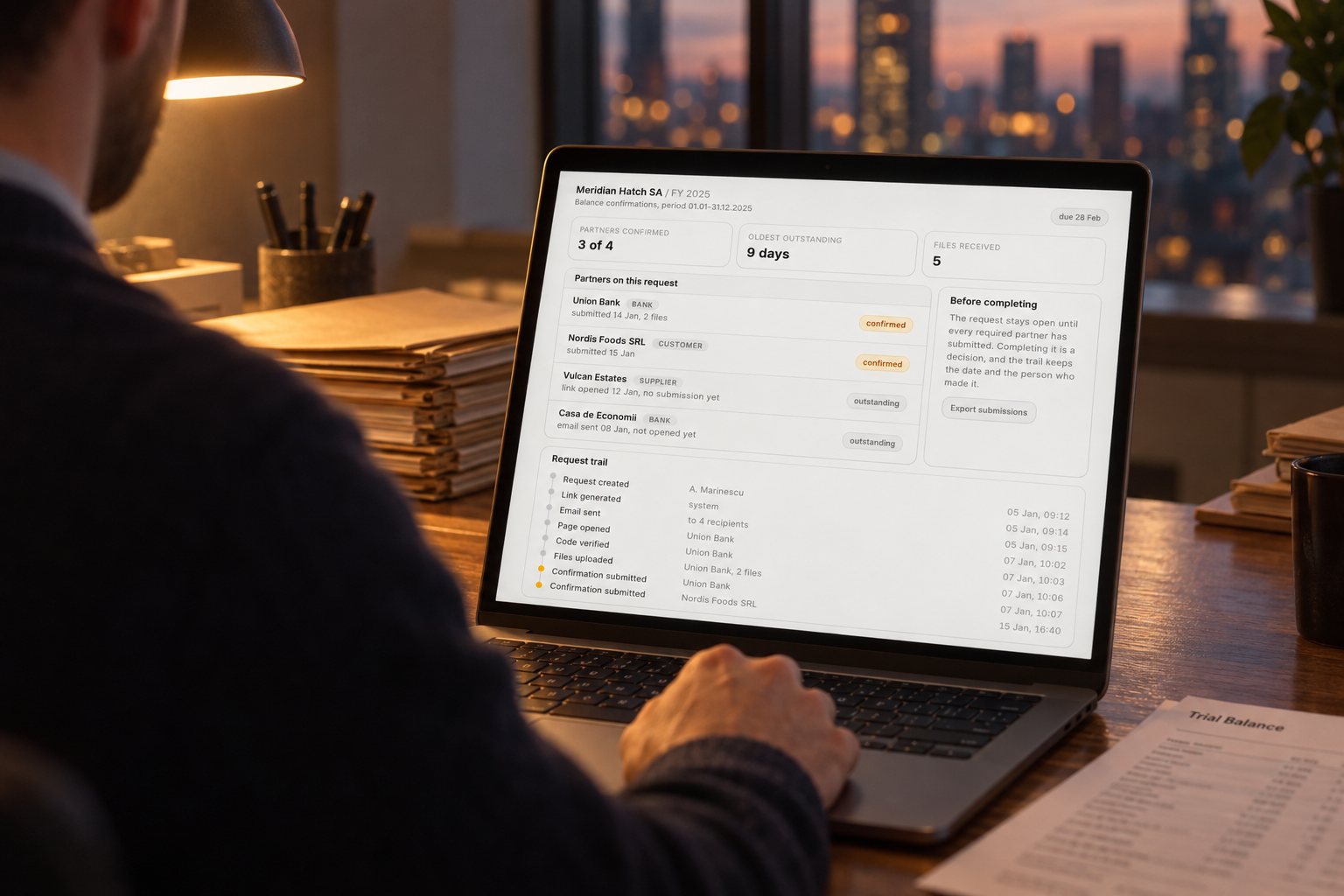
- An audit module inside their own app. The firm's platform gained a clients list, a per-client page, and a request page that shows every recipient with its state and the full trail underneath: link generated, email sent, page opened, code verified, files uploaded, confirmation submitted. The partner companies a client must confirm with are listed explicitly, and a request cannot be marked complete until each one has submitted, which is what stops a confirmation being quietly missing when the file is signed off. The submissions export to a spreadsheet in one click, in the shape the working papers expect.
The links are built to hold up in an audit file. Each link token is stored only as a hash, so a copy of the database cannot mint working links; any link can be revoked; the session expires with the due date; uploads are type-checked and land in private object storage; and every action carries who, what and when. Those details exist because the trail ends up in working papers, where anything relied on has to be explainable end to end.
Meridian Hatch SA asks you to confirm balances
as of 31 December 2025 · due 28 February 2026
Balance of payables
€12,400Purchases during the period
€86,910Supporting documents
Your name and role are recorded with the submission.
Submit confirmationWhat the recipient sees, in spirit and with sample data: only the categories this request asks for, the values to confirm, and a place for the export their software produces.
How confirmations are managed now
Around 30 audit clients went through last year's round on the platform, and more than 100 confirmations came back through it. The dashboard lists every request by client and every recipient by state, so the standing question of the confirmation round, who is still outstanding, is answered on screen rather than by opening folders. The client sees the same list from their side. When they know exactly which of their partners still owe a reply, they chase those themselves, by phone or by email.
Meridian Hatch SA / FY 2025
Balance confirmations, period 01.01–31.12.2025
partners confirmed
3 of 4
oldest outstanding
9 days
files received
5
Partners on this request
Union Bankbank
submitted 14 Jan, 2 files
Nordis Foods SRLcustomer
submitted 15 Jan
Vulcan Estatessupplier
link opened 12 Jan, no submission yet
Casa de Economiibank
email sent 08 Jan, not opened yet
Before completing
The request stays open until every required partner has submitted. Completing it is a decision, and the trail keeps the date and the person who made it.
Export submissionsRequest trail
Request created
A. Marinescu
05 Jan, 09:12
Link generated
system
05 Jan, 09:14
Email sent
to 4 recipients
05 Jan, 09:15
Page opened
Union Bank
07 Jan, 10:02
Code verified
Union Bank
07 Jan, 10:03
Files uploaded
Union Bank, 2 files
07 Jan, 10:06
Confirmation submitted
Union Bank
07 Jan, 10:07
Confirmation submitted
Nordis Foods SRL
15 Jan, 16:40
The request page from the firm's side, in spirit and with sample data: every partner company on one list, and the trail of what happened underneath it.
Response times varied, as they do. Several partner companies confirmed within a couple of days of receiving their link; the rest needed chasing, which is still a job for a person. There is no before figure to quote, because nobody timed the old process. What is new is that the response which does arrive is on the record: timestamped, with its supporting documents, against the request it belongs to.
What it replaced
The confirmation platform replaced nothing the firm uses for its audit work. The audit software, the document management and the accounting tools stayed exactly as they were. The new platform sits beside them, collects the evidence, and hands it back as an export the working papers can take directly. That was the client's condition on this project, and it matches our default on every one.
The loop worth generalising
A confirmation is one instance of a loop most firms will recognise: ask, wait, chase, log, prove. Wherever that loop runs over email, the fix takes the same two pieces: a page the counterparty is happy to land on, and an append-only trail behind it. Engagement letters and document request lists are the next two candidates for the same treatment. Outside audit work, supplier statement reconciliation is the same loop in a different industry, which is why we treat this as a pattern rather than a one-off build.
If your firm still runs confirmation requests over email, two questions locate the gap. Where does the list of outstanding confirmations live right now, and who would notice if it drifted? If the honest answer is a folder and a spreadsheet, that is the kind of project we build. Have a look at how we price, and tell us about your process. A few sentences are enough to start.
Frequently asked questions
What is a balance confirmation in an audit?
A written statement from an outside party, such as a bank, customer, supplier or lender, confirming the balance or activity recorded for them in the client's accounts. ISA 505 distinguishes three kinds: a blank positive form the party fills in, a positive form with the balance pre-filled for the party to confirm, and a negative one where they reply only if they disagree. It counts as independent evidence because it comes from outside the client's own records.
Who should send confirmation requests, the auditor or the client?
The auditor designs the request and decides what it must contain; the client typically sends it, because the counterparties are the client's own banks, customers and suppliers. That split is where a platform helps: the client supplies each recipient's details, the system issues that recipient their own link, and both sides see the response as it lands.
What do you do when a counterparty doesn’t return a confirmation?
Chase first; a reminder is a normal part of the process. If the confirmation still does not come, perform the alternative procedures ISA 505 requires, such as inspecting later payments and matching statements. What matters is that the file shows exactly what was sent, when it was viewed and what was done about the silence. A timestamped trail turns that from recollection into record.
Can an auditor accept a software export instead of a filled confirmation form?
Many companies will not fill a template and instead send an export from their accounting software, such as a WinMentor or SAP printout. Whether that substitutes for a confirmation is a judgement for the audit file. The practical point is to capture what actually happened: the values the party gave, the document they sent and when they sent it. A structured submission with the export attached does exactly that.
How do firms track confirmation status across many clients?
Commonly with a spreadsheet that starts accurate and drifts: replies land in different inboxes and the sheet disagrees with reality within weeks. The alternative is to make the tracking part of the product: one row per recipient with its state, an append-only log behind it, and a status list the auditor and the client both read. One firm ran about 30 audit clients and more than 100 confirmations through this setup last year.
Have a workflow that looks like this one? Tell us about it — a few sentences is enough.